
Introduction
An AI agent working on the web needs to understand the page, interact with its controls, and use the results to decide what to do next. It needs to know which content has appeared, which controls are available, and what happened after a click. The browser already has much of this information from rendering the page and handling interactions.
ACE Protocol gives agents more direct access to that information. Implemented inside Chromium, this browser-native protocol uses the browser's existing layout, paint, and control state to provide a compact semantic view of the page and connect action execution with result observation.
Why Browser Agents Still Have to Guess
Consider a task such as finding a contact, changing their job title to Senior Software Engineer and their location to New York, then confirming that the changes were saved.
To complete this task, an agent needs to answer at least four questions:
- What is on the page now?
- Is the page stable enough to start interacting?
- Which control should I use, and how should I click or enter text?
- What happened after the action?
A screenshot preserves the page's appearance. The agent has to identify text, positions, and relationships between controls before deciding how to act. Reading page structure provides text and node identity directly, but still leaves gaps: a DOM node may not yet be visible, and the browser may have started a download even though the page text has not changed.
Existing automation frameworks already provide locators, action checks, and automatic waiting. ACE Protocol focuses on organizing the browser's state information for models to use directly, and linking observations, readiness checks, actions, and results.
The protocol defines four kinds of information:
- Observation: useful content and available actions in the page's current rendered state.
- Readiness: whether the current document has reached the protocol's stability conditions at some point.
- Action: executing operations through the browser's native interaction and editing mechanisms.
- Effect: whether an action caused navigation, page changes, focus changes, a download, or no observable result.
The agent still decides what to look for, which action to take, and whether the result meets the task's requirements. The browser supplies the facts it can observe.
How the Protocol Organizes an Interaction
An interaction usually follows this sequence:
Read the page → Choose an action node → Execute → Read changes → Observe again as neededThree interfaces support this sequence: Page.getAIPageContent reads the page, Page.performDOMAction executes an action, and Page.getAIPageActionChanges retrieves the changes observed afterward. Clients call them through Chromium's debugging protocol, CDP.
This information comes from two places. The renderer process handles page content, control state, and interactions, while the browser process handles navigation, new tabs, and downloads. The protocol connects observations from both sides so the agent can check what an action changed inside and outside the page.
Observation: Extracting Actionable Semantics from Rendering
Understanding DOM, Layout, and Paint
The DOM describes document structure, such as a heading, paragraph, and button belonging to the same container. It records the relationships between content and nodes, but that structure alone does not tell us where text will wrap, how much space an element will occupy, or which content will be covered.
Layout uses styles to calculate sizes, positions, and line breaks. DOM nodes and the resulting layout do not have a one-to-one relationship: hidden elements may not participate in layout, while a single text node may span multiple lines.
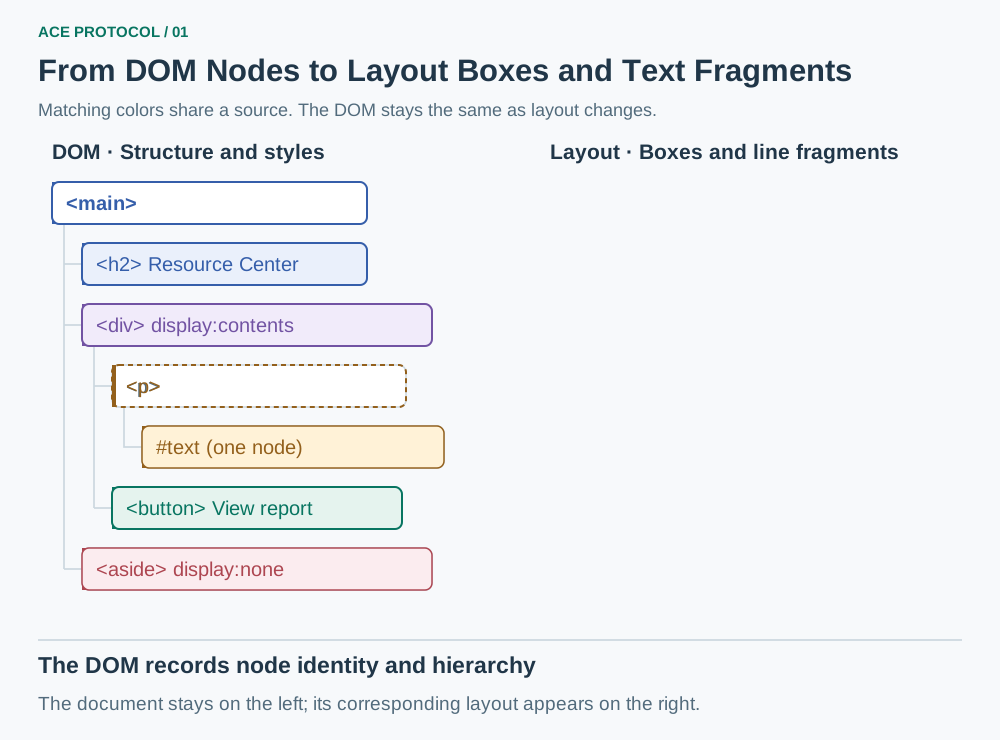
Figure 1: The same document structure produces different layouts as styles and container width change. Matching colors indicate the same content source.
Paint determines the drawing order of backgrounds, text, and foreground content. That order helps assess occlusion. At this stage, structural relationships between content are still available, before the result becomes pixels in a screenshot.
ACE Protocol uses all three: the DOM for content and identity, Layout for positions and text arrangement, and Paint to assess occlusion. Before a read, the protocol updates layout and paint state to reduce the chance of combining new content with old positions.
Filtering Definitely Invisible Content and Preserving Uncertain Cases
When extracting text, controls, and action information, ACE Protocol first filters out content that has no valid display area, is hidden by styles, or is fully transparent. It then uses paint order to assess occlusion.
Occlusion checks are conservative. The protocol removes content only when it can establish that a later-painted opaque region fully covers it. When transparency, partial coverage, or complex visual effects make full occlusion uncertain, it keeps the content.
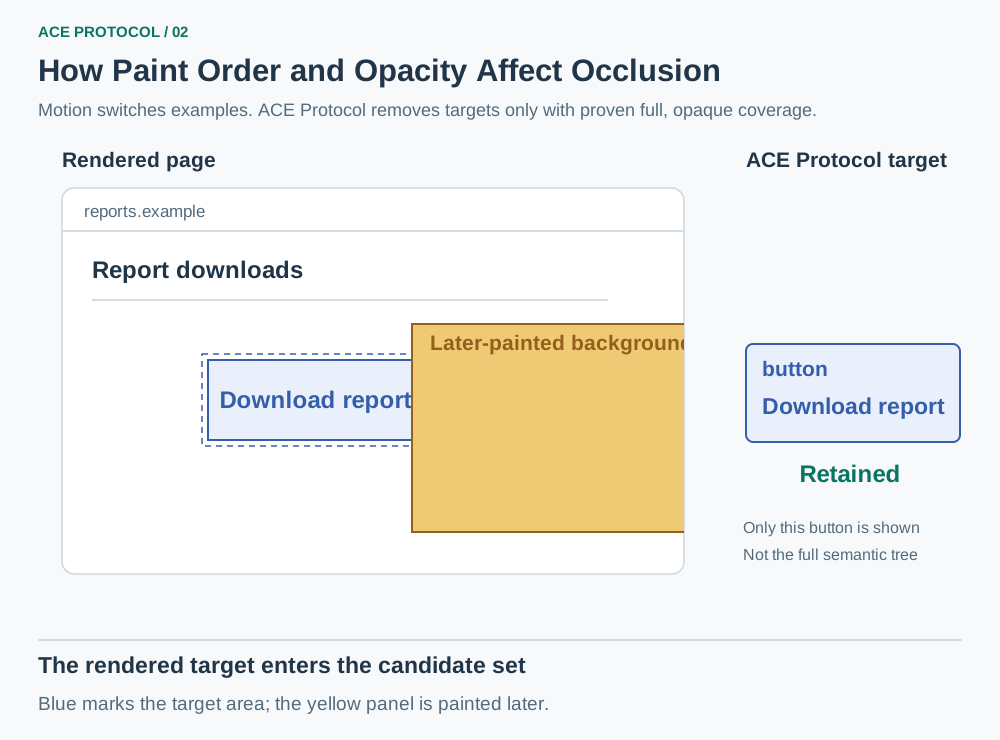
Figure 2: With the overlay stationary and no uncertainty from animation or similar factors, full opaque coverage removes the target. Translucent or partial coverage preserves it.
Because the output includes content whose occlusion is uncertain, it may differ from what a person sees on screen. Keeping that content reduces the chance of discarding useful information.
Scroll Reachability: Observing Without Changing the Scroll Position
The screen usually shows only part of a document. Scrolling every time an agent needs to read beyond the viewport can trigger scroll events, lazy loading, or virtual list updates. The attempt to inspect the page ends up changing its state.
ACE Protocol checks whether content that has already been rendered can be reached through normal scrolling, and includes it in the observation without changing the scroll position. The page's own clipping rules still apply.
This covers only content that has already been rendered. Virtual list items that have not been created and data that has not loaded are not included. Returned nodes may sit at different scroll positions and may not fit into a single screenshot.
Compressing Structure While Preserving Content and Action Relationships
Web pages often nest several layers of containers for layout and styling. ACE Protocol collapses wrappers with no independent meaning, merges text fragments belonging to the same content, and places button names directly on button nodes. This reduces the amount of context the agent has to read.
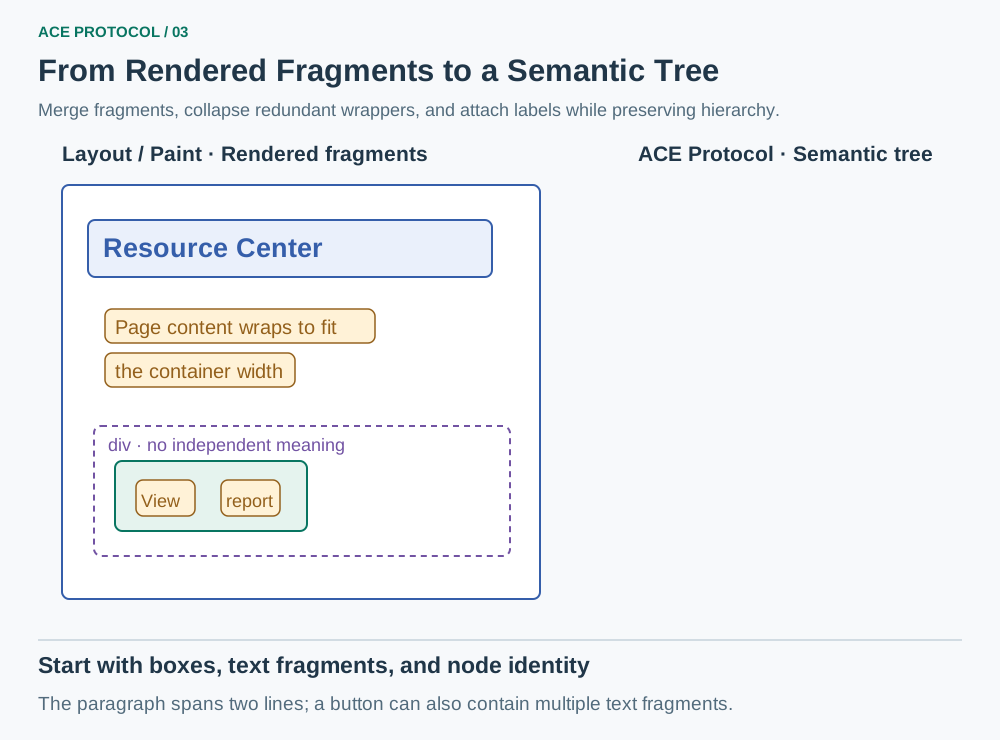
Figure 3: After merging text fragments and collapsing redundant containers, the semantic tree still preserves the necessary content hierarchy and actions.
The compression preserves table structure, meaningful groups, and the relationship between content and its controls. For example, the text in a card must remain associated with its Edit button, or the agent could modify the wrong object.
Inputs, text areas, and select controls expose their names, current values, options, and available actions in a consistent form, without the browser's internal control structure. Some inputs that are not displayed may still contribute form information. When a field appears in the output, the agent still needs to check whether it can currently be used.
The default output omits coordinates, debugging details, and empty fields. Information such as link destinations can be requested when needed.
Here is a simplified response:
{
  "url": "https://example.test/reports",
  "ready": true,
  "content": {
    "role": "main",
    "children": [
      {"role": "heading", "text": "Resource Center"},
      {"text": "Page content wraps to fit\nthe container width"},
      {"id": 42, "role": "button", "text": "View report", "action": ["click"]}
    ]
  }
}
The 42 is a temporary node ID for actions following this observation. After navigation, a substantial page rebuild, or node invalidation, the agent should read the page again. It must not treat the ID as a permanent business identifier.
Readiness: Has the Document Reached a Stable State?
Even after a page finishes loading, asynchronous components may not be ready and background requests may continue. A fixed wait is hard to get right: it wastes time on fast pages and may still be too short for slow ones.
ACE Protocol combines signals such as network activity, changes to page structure, and pending scripts to determine whether the document has met stability conditions over a period of time. It also limits how long slow resources can block readiness checks.
ready=true means the current document has reached the protocol's stability conditions at some point. The value stays true within the same document; subsequent local updates do not automatically reset it to false. Readiness is evaluated afresh when the document is replaced or reopened.
Readiness helps the agent choose when to observe, but it does not guarantee that task-specific data has appeared or that the page is completely still at that moment. The agent must still check the content it depends on, such as whether the contact form has loaded.
Action: Executing Inside the Browser and Revalidating the Target
The agent passes a node ID from its observation and an action type to Page.performDOMAction, for example {"id":42,"action":"click"}. At execution time, the browser resolves and validates the node again to check that the observed target is still available.
ACE Protocol currently supports six action types:
| Action | Main purpose |
|---|---|
click | Click buttons, links, and controls |
input | Enter text in inputs, text areas, or supported editable regions |
input_submit | Enter text and submit a form |
hover | Trigger hover menus, tooltips, and related states |
press_key | Send Enter, arrow keys, or keyboard shortcuts |
select | Choose one or more options in a native select control |
Actions reuse the browser's native interaction and editing mechanisms. For example, entering text involves both changing a field's value and triggering the corresponding editing events so the page can validate the input or update its state.
The page may have changed between observation and execution. At execution time, the browser checks whether the target still exists, whether it is disabled or read-only, and whether it meets the conditions for the requested action. If the page cancels an edit, the protocol respects that result.
These actions use native interaction mechanisms, but they still differ from physical hardware input and do not guarantee support for every custom control. Some click paths can dispatch events to a target that is initially obscured, so a person may be unable to click it with a mouse even when the protocol reports success.
Effect: Connecting Changes Inside and Outside the Page to One Action
When performDOMAction returns ok=true, it means only that action dispatch ran successfully. The agent still needs to know what changed.
ACE Protocol compares page state before and after an action and combines this with observations from the browser process. It reports navigation, new tabs, changes to page content, field values or focus, and downloads. If no change is observed or the action fails, it reports that too.
For example, clicking Download report may leave all page text unchanged while the browser detects a download. The protocol can associate the download with the action, giving the agent evidence beyond the page text.
Effect returns change types and related state, but may not include a complete content diff. To find out exactly what changed, the agent needs to read the page again. The client must allow time for the expected change before fetching the action's result. Each action result is consumed only once, so repeated reads cannot be used to keep polling for changes.
The task's outcome needs a separate check: download does not prove that the file has finished downloading, and no_op does not prove that the server did not process a request. In the contact example, the agent must still confirm that the new job title and location were saved.
Integrating the Protocol into an Agent Workflow
A client that can send custom CDP commands can connect to a browser with ACE Protocol support and call these interfaces directly. The accompanying reference client manages connections and action order, and provides ways to reduce round trips between the model and browser.
Identify the page, then observe and act in order. The reference client uses a Target ID to identify the interaction target, keeping observations and actions for different pages separate. A single content read does not automatically include every iframe. To interact with a child document that can be connected to independently, the client should switch to that target and observe it again.
Submit a known sequence of actions in one batch. If the job title field, location field, and Save button are all identified in the contact form, the client can fill the two fields and then click Save in one batch. This avoids the overhead of separate calls. Actions that navigate or rebuild the page should come last. If a later action depends on new state, observe the page again first.
Batch actions still execute in order and stop on failure. Completed operations are not rolled back, so the agent should not simply retry the entire batch. The returned Effect belongs to the last action executed, while individual execution results are retained separately. The agent must still check the final page state to confirm completion of the whole task.
Give the model only the information the task needs. The reference client can also turn the semantic tree into an outline or retain only relevant nodes and fields. When editing a contact, the content sent to the model can focus on the profile form, leaving less of the context occupied by unrelated navigation.
Performance: Fewer Reasoning Rounds and Lower Token Costs
Evaluation Setup
This evaluation compares three complete agent workflows: ACE Protocol, Browser Use, and agent-browser. It covers 10 structured web tasks, including sending messages, updating forms, editing content, and changing state across pages. One run was selected for each task and approach, for 30 traces in total. All three groups used the same task definitions, the gpt-5.6-sol model, and medium reasoning effort. Reasoning rounds are counted as model responses.
Overall Results
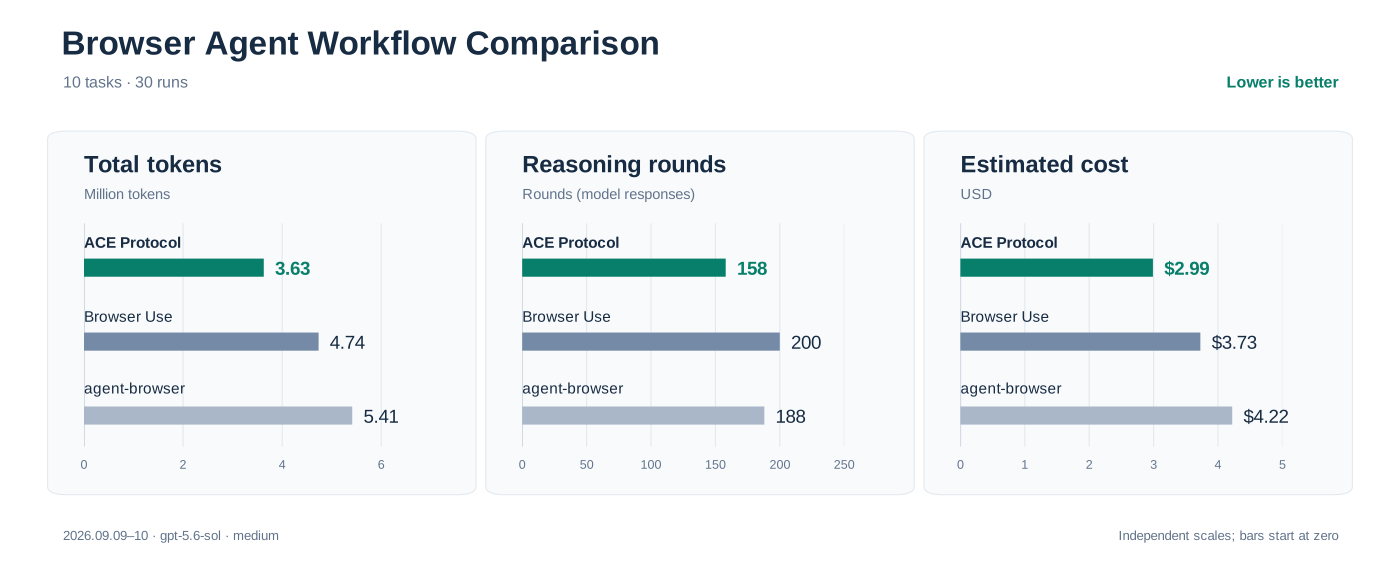
ACE Protocol recorded the fewest reasoning rounds, the lowest total token usage, and the lowest estimated cost among the three groups in this evaluation. ACE Protocol, Browser Use, and agent-browser used 158, 200, and 188 rounds, respectively. Compared with Browser Use and agent-browser, ACE Protocol reduced reasoning rounds by 21.0% and 16.0%, and estimated costs by 19.8% and 29.2%. Chart values are rounded; reductions are calculated from the original precise values.
Interpretation and Limitations
Semantic observations bring control state, available actions, and page readiness together for the agent to read. Known actions can be batched, and observations after an action can be limited in scope. These mechanisms can reduce model round trips. The ACE Protocol workflow used fewer reasoning rounds and input tokens in this evaluation, but the comparison covers complete workflows, so it cannot tell us how much each capability contributed.
After finding a button, the agent still needs to confirm which business object it belongs to. Preserving the relationships between content, hierarchy, and action buttons helps with that check. If page semantics do not identify the object, an agent using ACE Protocol may still need several observations and navigation steps to find it. There is room to reduce those round trips.
These results come from simulated applications, with only one selected sample per task and approach. The evaluation did not pin a model snapshot or use repeated trials with randomized, interleaved runs. Initialization differences and application state both affect the comparison. The results describe only how these complete workflows performed in this evaluation environment. Repeated evaluations under consistent conditions are needed to establish whether the gains hold reliably.
When Vision Is Still Needed
ACE Protocol is suited to pages with clear structure, state, and interaction semantics. Form-heavy enterprise applications, multi-step content management, administrative tools, project boards, and payment workflows all require agents to repeatedly read control state, fill in fields, perform actions, and check results. Getting this information directly from the browser avoids some of the work of reconstructing state from pixels or page scripts.
Tasks that span multiple pages or windows can use these capabilities too. To check navigation, downloads, new windows, or changes within a page, the agent can get the relevant information through Observation, Action, and Effect. This reduces the work of gathering and combining that information separately from screenshots, DOM inspection, waiting logic, and follow-up checks.
Canvas drawings, maps, games, remote desktops, and image editors often require interpreting pixels. When the semantic tree cannot express color, shape, relative position, or overall composition, screenshots and vision models are still needed. The tree can provide some structural information, but it cannot replace those visual judgments.
A practical integration can start with ACE Protocol to read structured state and execute actions, then add screenshots and visual interpretation when the semantic tree cannot express the content. This still supports interfaces that depend on vision while reducing image interpretation costs for ordinary forms and buttons.
Conclusion
Browser agents have often worked from the outside: inferring the page's current state, deciding which elements can be used, and then working out what an action actually changed. Screenshots and DOM scripts can get the job done, but they leave many questions to the model that the browser is already equipped to answer.
ACE Protocol extracts actionable semantics from the rendered page, uses explicit stability conditions to guide observation timing, executes actions through native browser interaction mechanisms, and returns the changes the browser observed as Effects. The agent remains responsible for understanding the goal and making task-level decisions; the browser makes the underlying facts clear.
We want the browser to give agents direct access to the page state it already has: which content is available, whether an action can run, and what changed after it ran. ACE Protocol organizes its interfaces around these questions. The agent still decides what the task requires and whether the intended result has been achieved.
The goal is a browser environment where AI agents can understand the page, act, and verify results directly, without having to work through each interaction as a person would.