

Introduction
If a browser had been designed for AI agents from day one, would it still look like today's Chrome?
Our answer is Moli, a browser engine built from scratch, purpose-designed for AI agents. It can serve as a zero-cost drop-in replacement for Chrome in large-scale browser cluster or edge-node deployments. In our internal benchmarks on agent workloads, Moli's resident memory footprint runs at roughly 1/7 that of Chrome, with cold starts around 5x faster — and its functionality and stability have already been proven out in production.
This post explains where those numbers come from, why traditional browser architecture is wasteful for agents, and the specific trade-offs Moli makes as a result.
Why Build Another Browser
The Lexmount cloud platform runs our Chromium fork, Ace, on which we've done extensive work. But at the scale of deploying AI agent browsers — large-scale web automation, RL post-training, and similar workloads — we kept running into resource waste that was hard to cleanly cut away.
Greedy Resource Downloading
Most AI agent web-interaction scenarios don't actually need to download resources like images, fonts, or audio/video. Whether or not most resources are present rarely affects an agent's understanding of a page. And if an agent genuinely needs a given resource, it can simply grab the DOM node once the page has loaded, find the link, and download it separately.
Chromium eagerly discovers and schedules subresources because they may soon be needed for rendering. Even with resource prioritization, resources that are irrelevant to an agent can still consume bandwidth, connections, memory, decoding work, and other system resources.
This resource-loading behavior is deeply coupled to the browser engine, and Chromium doesn't expose a clean, easy way to filter it out.
Could this resource downloading instead be made optional, with control handed to the AI agent?
The Cost of Keeping Rendering State
A Quick Primer on the Browser Rendering Pipeline
The browser rendering pipeline is fairly involved; here's a simplified overview:

For clarity, this post abstracts the rendering process into the stages above throughout. Different rendering engines use different concrete data structures and naming — for instance, what this post calls the Box Tree roughly corresponds to Chromium's LayoutObject Tree and Firefox's Frame Tree; what this post calls the Layout Tree mainly corresponds to the Fragment Tree that layout produces in Chromium, while Firefox largely stores layout results in the Frame Tree and related structures.
Stage 1: HTML + CSS
At the start, a page is just HTML + CSS source:

<main>
  <h1>Hello World!</h1>
  <button>CONTINUE</button>
</main>
h1 {
font-size: 24px;
}
button {
background: purple;
}Stage 2: DOM Tree + CSSOM Tree — Parsing Structure, Computing Style
Once the browser has downloaded and parsed the HTML and CSS, it continuously maintains the page's DOM tree and CSSOM tree.

The parser turns the HTML into a DOM:
main element
├── h1 element
└── button element
Meanwhile, the CSS parser parses the CSS, matches elements against it via selectors, and — through cascade, inheritance, and related processes — arrives at each element's final computed style.
h1
    font-size: 24px
    display: block

button
    background: purple
At this point, the browser already knows what's on the page, and what visual properties each thing has.
Stage 3: The Box Tree — From Structure to Boxes That Participate in Layout
Next comes a genuinely important transformation.
The DOM describes page elements, but what the layout engine actually needs to work with are visual boxes.
At this stage, the <h1> from the diagram starts turning into a CSS box — this is where the familiar web box model begins to appear.
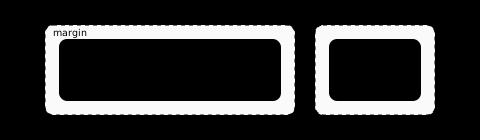
Why can't layout operate directly on the DOM? Two examples:
- If an element's CSS marks it as not displayed:
display: none;that element produces no box that participates in layout at all.
- If a CSS rule targets
::before:
.foo::before {
  content: "★";
}
::before isn't really a DOM child, yet it does produce a visual box (containing ★) that participates in layout.
To let the layout system stay focused purely on layout, browser rendering pipelines generally include a Box Tree as an intermediate layer bridging the DOM tree and the Layout Tree.
Stage 4: The Layout Tree + Text Shaping — Giving Every Box Real Coordinates and Dimensions
Having a box still doesn't tell you its exact position or size.
At this layer, the layout engine computes each element's geometry from the box's computed style together with layout rules (flex, grid, etc.).

For the diagram, the box for "Hello World!" ends up with properties roughly like:
x, y = (35, 35)
width, height = (190, 30)
Meanwhile, the text "Hello World!" runs through the font-layout engine:
font selection
     ↓
character-to-glyph mapping
     ↓
kerning / shaping
     ↓
line breaking
     ↓
baseline / line boxes
Only now does the browser truly know where every character sits — line width, baseline, text height, and so on — with the final results stored as the Layout Tree.
Stage 5: Paint — Turning Layout Geometry into Pixels
By the time layout finishes, the browser already knows every Layout Tree element's position, size, color, and so forth.

For simplicity, we group paint, rasterization, and compositing into the “Paint” stage in this post.
The Paint stage converts all of that into drawing operations and finally renders them to the canvas. Once this stage completes, the page as a human sees it has come into being.
The Rendering Pipeline Is Caching Everything, Everywhere
To keep a page running at 60 FPS, the browser has to finish a frame update within a dozen or so milliseconds.
So Chrome's Blink engine holds onto the intermediate state of every stage of the rendering pipeline for the long haul:
DOM
 ↓
Box Tree        → caches which elements participate in layout, and their box structure
 ↓
Style           → tracks which nodes need style to be recomputed
 ↓
Layout          → caches element position, size, and layout results
 ↓
Paint           → reuses unchanged paint commands and rasterized output
That makes sense for a human-facing browser, since a user might scroll, hover, or trigger an animation at any moment. But AI agents behave differently. Two examples:
- An agent opens a page and, for the next several seconds, only reads the DOM, text, network responses, and JavaScript state — it doesn't care whether some div is currently 183px or 187px wide right now.
- An agent opens a page, takes a single screenshot, spends the next several seconds doing unrelated analysis, and only takes another screenshot — before moving on to something else — a few seconds later.
For scenarios like these, rather than holding on to the last frame while waiting for the next, it may actually save both memory and CPU to compute a frame only when it's genuinely needed. This logic, too, is deeply coupled to the engine internals and just as hard to cleanly rework.
Moli: Redefining the AI-Native Browser
Most of the time, what an AI agent needs is the DOM, text, links, form state, network responses, and executable page semantics; it only genuinely needs a rendered result when dealing with occlusion, overlays, spatial relationships, or confirming a final outcome. What it needs is a browser that can understand a page, execute a page, and — when necessary — see a page, not a virtual screen that permanently ties up a large chunk of memory.
Moli is the answer we're offering:
Moli is a browser engine, built for Web Fetch and BrowserUse workloads, redesigned from the ground up for AI agents.
In typical agent workloads, Moli's resident memory can drop to roughly 1/7 of Chrome's, with peak memory around 1/3 of Chrome's — while standard browser capabilities such as iframes, Workers, Wasm, cookies, WebCrypto, IndexedDB, OPFS, and CDP/WebDriver debugging remain fully implemented within the very same engine.
On top of that, we've built out a range of features specifically for controlling how pages load, designed with agents in mind. Compared with a traditional browser, Moli hands control over how to reach the desired content back to the agent.
An On-Demand Rendering Pipeline
The traditional rendering pipeline was covered above and won't be repeated here.
Moli's most aggressive design decision concerns caching within the rendering pipeline:
- Moli's rendering path is one-shot and cache-free. Every render re-runs Box Builder, layout, text shaping, and CPU paint from scratch against the current DOM and CSSOM to produce a single frame. The low-frequency CDP Screencast is simply this same one-shot pipeline repeated on a fixed cadence.
- Moli only kicks off a full render pass when there's an actual image request.
This pays off clearly in low-frequency browser-operation scenarios: while a page isn't being rendered, there's no ongoing memory cost from a persistent Box Tree or Layout Tree; and for the occasional low-frequency render, the CPU cost of computing everything from scratch isn't significant either (under 30ms) — taken together, this comes out lower than Chromium overall.
Moli's memory advantage is therefore a direct consequence of the architecture itself, not something that depends on any single clever optimization.
One Binary, Three Automation Protocols
There are three browser automation/control protocols you can't avoid in the browser world: CDP, WebDriver Classic, and WebDriver BiDi.
The automation and testing frameworks people actually use tend to split along these lines — Playwright and BrowserUse lean on CDP, while Selenium leans on WebDriver Classic and BiDi.
With Chrome and Firefox, the WebDriver protocol typically requires installing an extra binary (ChromeDriver, GeckoDriver) whose version has to be kept in strict lockstep with the browser — a dependency that's an easy source of failure in AI agent deployments.
Moli, by contrast, natively implements all three protocols with zero external dependencies: Playwright, BrowserUse, and Selenium can all connect directly, with no separate browser or driver install required.

Moli Is Already Highly Complete
Moli isn't a glorified curl. We've put serious effort into making it genuinely production-ready:
WPT Pass Rate
For web standards, we've run the full web-platform-tests (WPT) suite against Moli, currently passing 1.612 million test cases.
For core capabilities like Fetch, XHR, Forms, Worker, WebStorage, WebCrypto, and Wasm, we've matched Chromium's WPT coverage exactly.
For the web's fundamental security semantics — CORS, CSP, CORP, COEP, cookies, and storage partitioning — Moli has full implementations backed by thorough regression testing, which is the baseline guarantee any AI agent use case needs.
Automation Protocol Support
Among the automation protocols, WebDriver Classic and BiDi are part of web standards and have WPT coverage — but Chrome's CDP behavior has no formal standard to test against. To cover that gap, we built LexBench-Headless-Browser, which benchmarks Moli using 13 different but commonly used browser-automation frameworks, combining behavioral compatibility with web-standard support. Results below:

(We also benchmarked KiteSurf — which Cloudflare has publicly released but not open-sourced — using Cloudflare's public CDP endpoint.)
Moli doesn't just support every common browser-automation framework; it also achieved the highest task success rate among the alternative headless engines we tested.
Overall Results
Comprehensive support for the Web API standards translates into strong real-world performance:
-
Because frontend frameworks are so widely used and can get quite complex, we specifically built more than 1,000 non-trivial Vue, React, and Angular test sites and compared their frame-by-frame DOM changes during load against Chromium — the results matched exactly.
-
We also tested core-content extraction against 192 public URLs, spanning both leading Chinese-language and English-language sites. Results:
| Engine | Useful pages | Success rate | Median time | Median RSS |
|---|---|---|---|---|
| Moli | 103 | 53.6% | 1.43s | 73 MiB |
| Chrome-Headless | 101 | 52.6% | 1.43s | 773 MiB |
| Lightpanda | 85 | 44.3% | 0.97s | 40 MiB |
| Obscura | 57 | 29.7% | 1.30s | 39 MiB |
"Success" here means more than an HTTP 200 and a clean exit — the page has to produce usable, rendered content. CAPTCHAs and human-verification challenges, JavaScript challenges, block pages, login walls, empty responses, and pages that render nothing but an app shell all count as failures. Moli edges out Chrome here partly because headless Chrome injects a UA string like
HeadlessChrome/151.0.0.0, which makes it an easier target for WAFs to block.
Real-World Scenarios
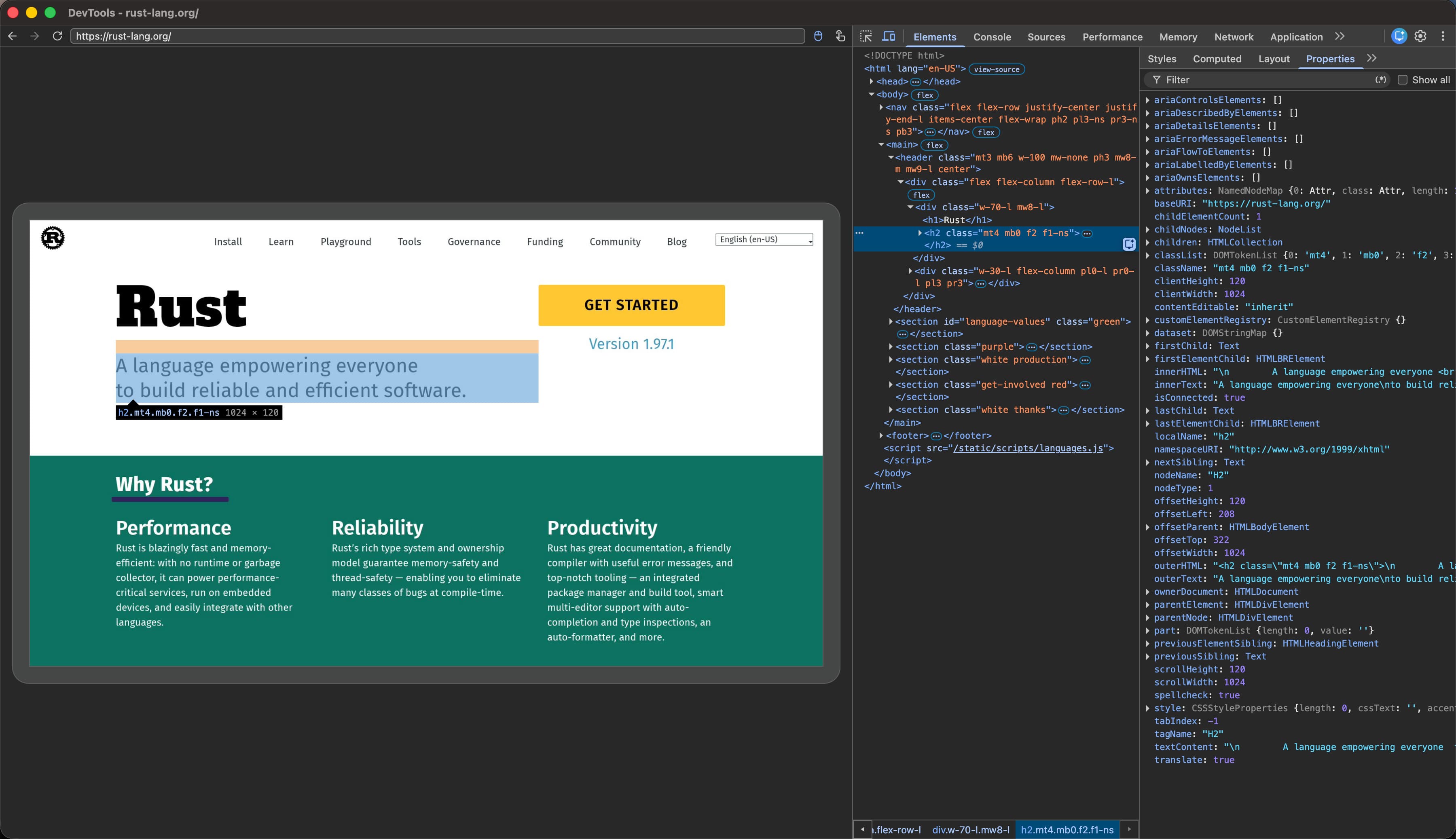
Connecting via Chrome DevTools and opening rust-lang.org — the DOM, CSS, and element picker all work exactly as expected.
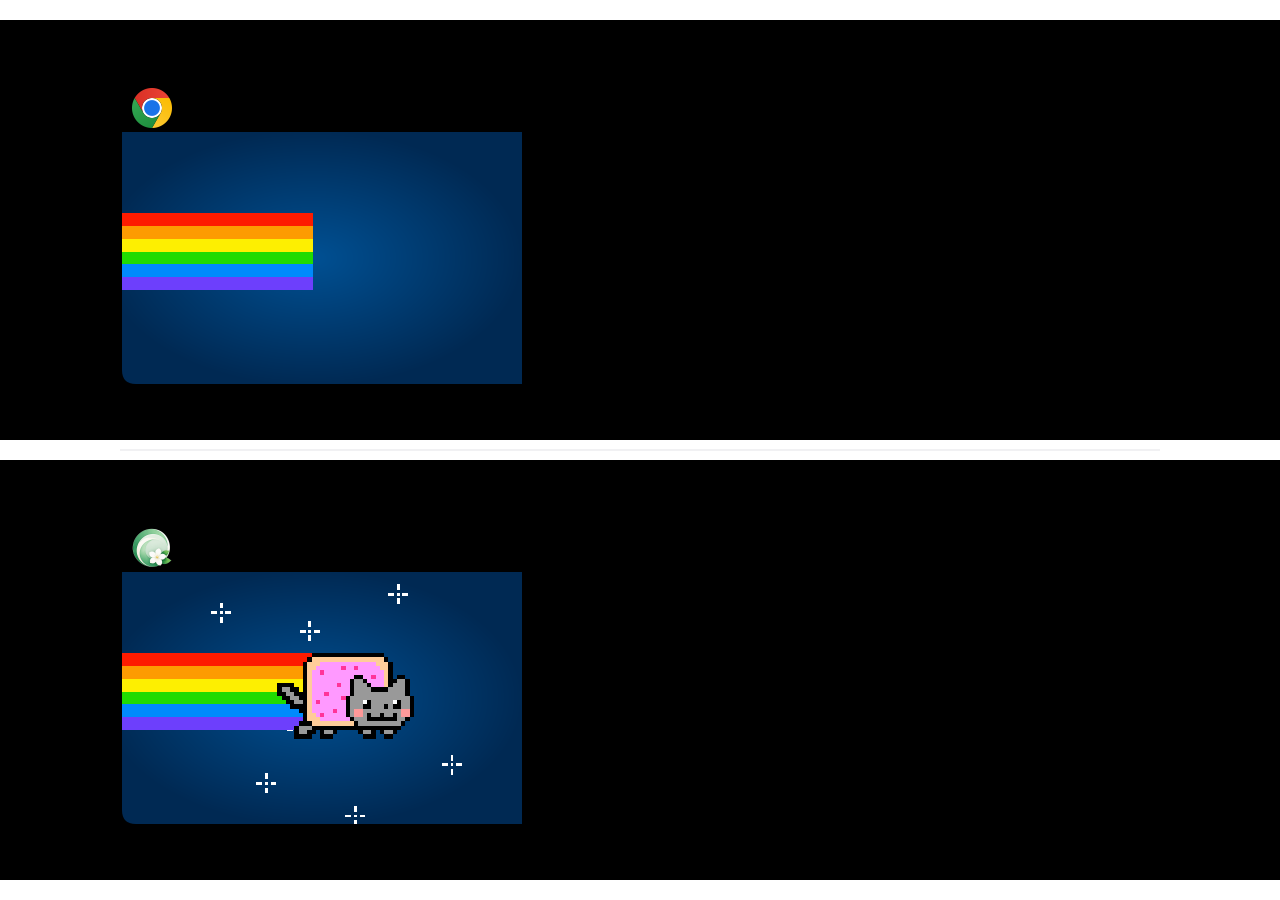
We've even run a full fighting-game simulator — built on Canvas, requestAnimationFrame, and keyboard input — inside Moli:

Why Rust
Moli didn't come out of nowhere.
The Rust ecosystem already offers a set of high-quality browser building blocks: Servo/Stylo provides the CSS parser, selector matching, cascade, and computed style; html5ever handles HTML parsing; rusty_v8 provides Rust bindings for V8; Taffy provides layout algorithms; Parley provides text shaping; AnyRender/Vello (CPU) provides a software-rasterization foundation; and usvg, together with the Rust image ecosystem, handles SVG and bitmap processing.
Without these projects, the Lexmount browser team simply couldn't have rebuilt a full browser pipeline — spanning networking, DOM, scripting, layout, and software rendering — at our current team size and in our current timeframe. Moli's real innovation isn't reinventing every low-level algorithm from scratch; it's rethinking what a browser looks like when it's built around agents.
A complete browser also happens to be the harshest stress test these underlying components can face: untrusted page input, long-running processes, async concurrency, and large-scale real-world sites surface compatibility, resource, and security issues that sample code and unit tests never touch. In the course of building and running Moli in production, we've already found and fixed a number of these.
We don't want Moli to be merely a consumer of the Rust browser ecosystem. Fixes, tests, and hardening that can be independently reproduced and that generalize beyond our own use case will be upstreamed over time; anything security-related will go through coordinated, responsible disclosure with the relevant maintainers before any technical details are published. Moli aims to give back to this ecosystem the engineering lessons that come from running real agent-browser workloads.
Performance Numbers
Full web support doesn't have to come at the cost of performance — rethinking a browser around agents can deliver order-of-magnitude system-level gains.
Above, we covered Moli's capability numbers; here we'll focus on performance.
In the LexBench-Headless-Browser tests, Moli achieves higher compatibility and feature support with a smaller footprint:

Here's what we observed in our internal RL training workloads:
| Metric | Moli | Chromium |
|---|---|---|
| CDP ready | 34.85 ms | 169.37 ms |
| episode active p50 | 33.40 ms | 57.13 ms |
| peak PSS | 102.46 MiB | 348.82 MiB |
| process / thread peak | 1 / 24 | 11 / 123 |
Moli's peak PSS runs at roughly 1/3 of Chromium's, and its idle PSS at roughly 1/7. Moli's average cold-start speed is roughly 5x that of Chromium's.
And here's another real RL training workload, this time with 64 concurrent browser sessions — Moli in yellow on the left, Chromium in green on the right:
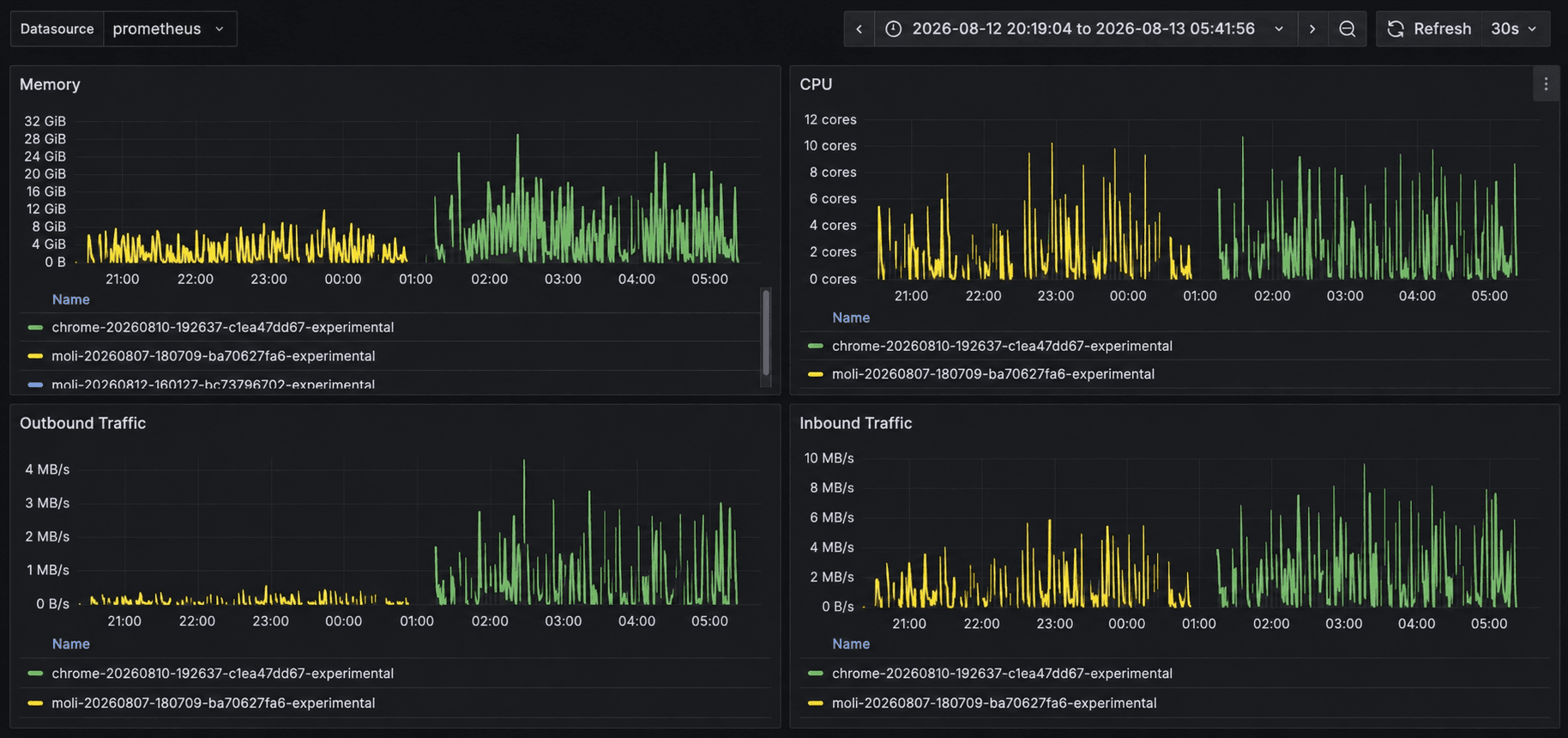
Whether it's large-scale deployment or edge inference, Moli is more efficient than Chrome across the board.
Closing Thoughts
If a browser had been designed for AI agents from day one, it probably wouldn't look like Chrome. We went back and made a fresh set of trade-offs from the agent's point of view: keep page structure and execution capability available at all times, and push the cost of layout, rendering, and some resource loading off until it's actually needed — all while holding on to as much of the compatibility a modern web runtime ought to have.
Today, Moli has met the goals we originally set for it, and it's already running real production workloads. That's why we've decided to open it up. We hope Moli can serve not just Lexmount, but become a genuine new option for anyone building AI agents.
We don't know exactly what the AI browser of the future will end up looking like. But we're more and more convinced it won't just be a traditional browser with an agent SDK bolted onto the outside. When the primary user of a browser changes, the browser itself is worth redesigning.
This is Moli.
Try it now: https://github.com/lexmount/moli